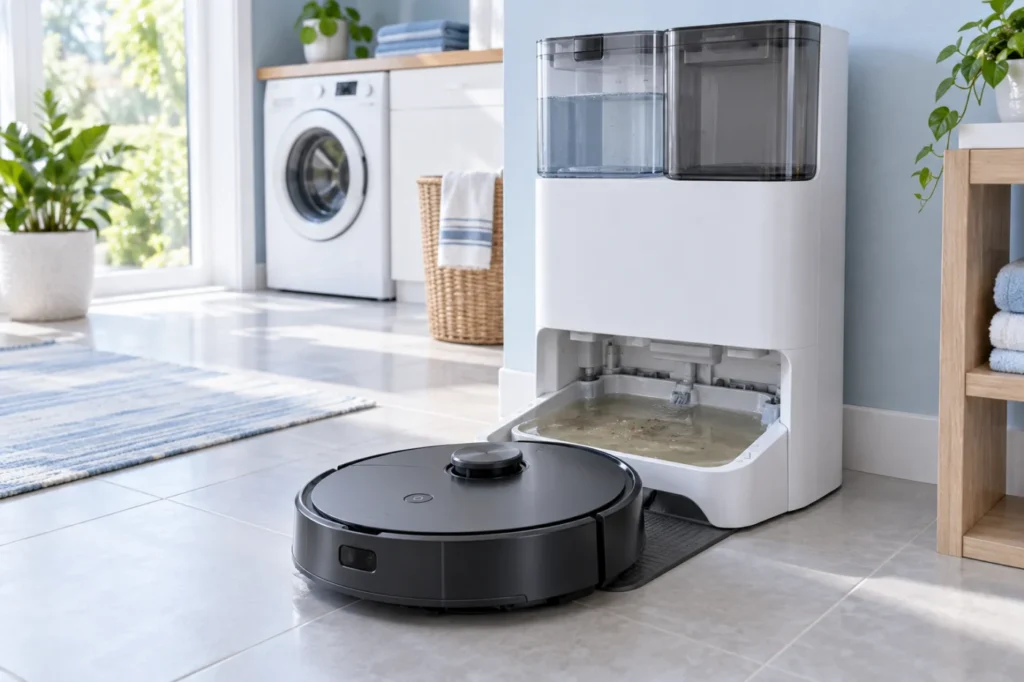
Begin with the quick checks. Stop if a step requires tools or experience you do not have.
Quick answer: If your Roborock Q Revo dirty water is not pumping from the dock wash tray into the waste tank, first empty and reseat the dirty-water tank, close its lid completely, and clean the removable washing tray and filter. Then restart the dock and run one controlled mop-washing test. If clean water enters the tray but dirty water still remains after these checks, the return pump, hose, or internal seal may require service.
The Q Revo dock uses two separate water paths. Fresh water moves from the clean-water tank to the mop-washing area, while used water is extracted into the dirty-water tank. Determining which side has failed prevents unnecessary cleaning and part replacement.
If the dock supplies little or no fresh water, use our Roborock Q Revo mop pads not getting wet guide. If fresh water enters normally but remains in the tray, continue with the dirty-water return checks below.
Before you start
- Pause the cleaning or mop-washing cycle.
- Remove the robot from the dock.
- Unplug the dock before removing or cleaning its washable parts.
- Keep water away from the power connector and charging contacts.
- Do not open the dock housing or disconnect internal hoses.
- Do not repeatedly run mop-washing cycles while the tray is already full.
Use gloves if the standing water has been in the tray for an extended period. Remove the water with an absorbent cloth or a small cup before taking out the washable tray.
Roborock Q Revo dirty water not pumping: what to check first
| Symptom | Likely area | First check |
|---|---|---|
| Dirty water stays in the wash tray | Waste-tank seal or tray drain | Reseat the tank and clean the tray filter |
| Fresh water enters, but none reaches the waste tank | Return path or extraction system | Listen for the extraction pump during washing |
| The waste tank receives only a small amount of water | Partial blockage or air leak | Clean the filter and inspect the tank lid |
| The dock makes a bubbling or hissing sound | Dirty-water tank not sealing | Wipe the lid, gasket, and tank rim |
| Foam accumulates in the tray | Too much or unsuitable cleaning solution | Rinse both tanks and test with clean water |
| The dock indicator is red | Tank, tray, filter, or dock error | Check the app message and reinstall removable parts |
When diagnosing Roborock Q Revo dirty water not pumping, begin with the removable components. A tank that looks correctly installed can still lose suction if its lid is not fully closed or if residue prevents the rim from sealing.
1. Restart the robot and dock
A temporary dock error can interrupt the washing cycle before the used water is extracted. Start with a normal restart before removing components.
- Cancel the current cleaning or mop-washing task.
- Remove the robot from the dock.
- Unplug the dock from the wall outlet.
- Wait approximately two minutes.
- Reconnect the power and confirm that the dock indicator behaves normally.
- Place the robot back on the dock and start one manual mop wash from the Roborock app.
Watch the tray during the cycle. If fresh water enters and is then removed, the problem was probably temporary. If water accumulates again, continue to the tank and drain checks.
2. Empty and rinse the dirty-water tank
A full tank can stop extraction, but residue inside a partly empty tank can also interfere with normal airflow. Remove the dirty-water tank, empty it, and rinse it with clean water.
- Open the tank lid and discard the dirty water.
- Add a small amount of clean water.
- Close the lid and gently shake the tank.
- Empty it again and rinse away remaining residue.
- Inspect the tank for cracks or deformation.
Do not use boiling water, corrosive cleaner, bleach, or sharp tools. The tank must keep its shape and seal correctly for the extraction system to work.
3. Check the dirty-water tank lid and seal
The dirty-water system relies on an airtight connection. If the tank lid is open slightly or dirt is trapped around its rim, the dock may be unable to create enough suction to lift water from the tray.
- Wipe the tank rim with a clean damp cloth.
- Clean the lid’s sealing surface and visible gasket.
- Check that the gasket is seated evenly and is not folded.
- Close every latch until the lid sits flat.
- Reinstall the tank firmly in its correct position.
If the Roborock Q Revo dirty water is not pumping and you hear air hissing near the top of the dock, repeat this check carefully. A change in the sound after pressing the tank lid down can indicate an air-seal problem.
4. Clean the wash tray and removable filter
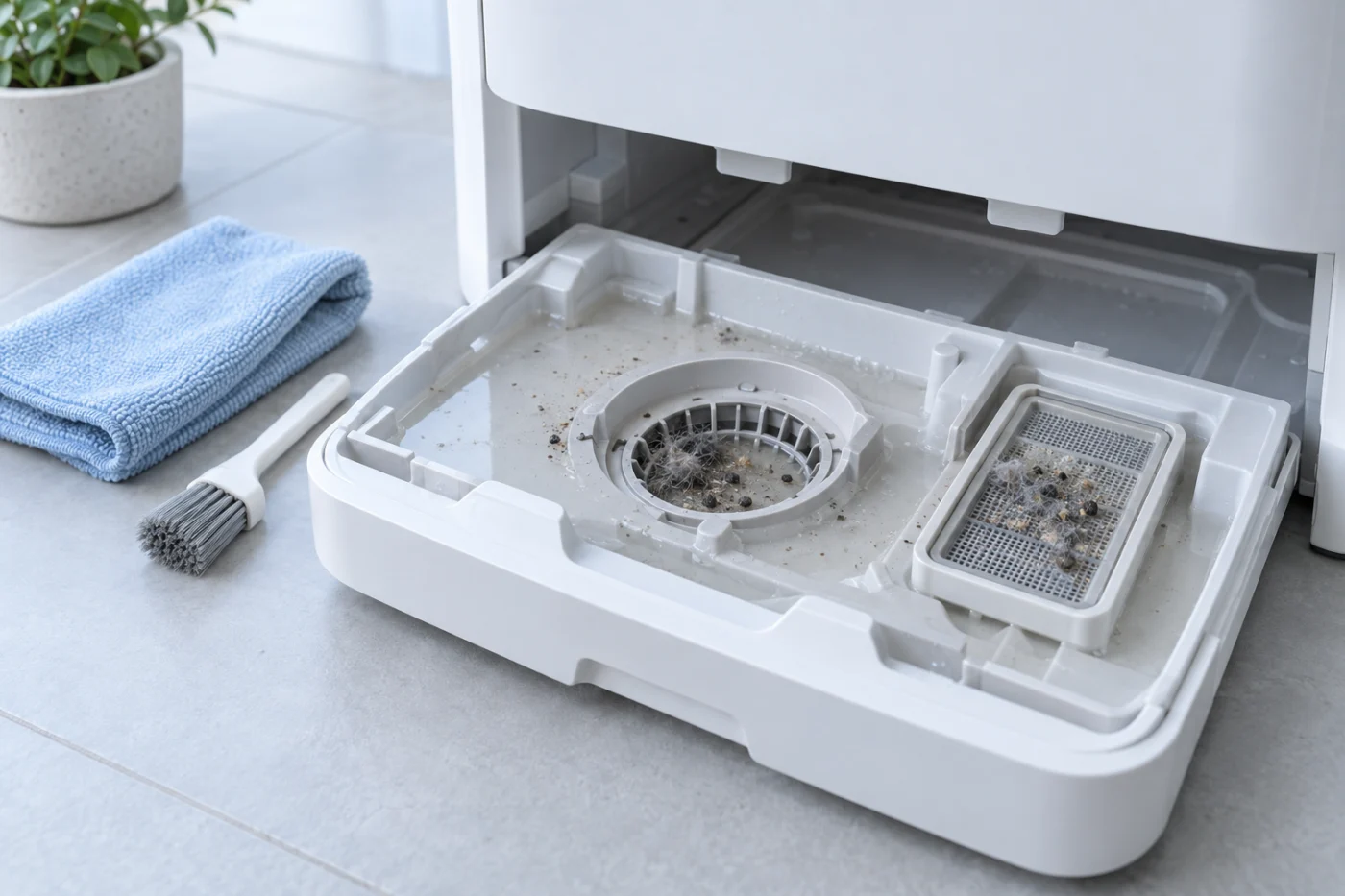
Hair, lint, pet fur, detergent residue, and floor debris collect around the tray filter and drain path. Even a thin layer of compacted debris can slow water removal.
- Unplug the dock.
- Remove standing water from the tray.
- Take out the removable washing tray according to the normal maintenance procedure.
- Remove and rinse the tray filter.
- Use a soft brush to loosen dirt from the washable channels.
- Rinse the tray with clean water.
- Reinstall the filter and tray completely.
Do not push needles, wire, screwdrivers, or other metal objects into the drain opening. A visible blockage may be cleaned from the removable tray, but the internal pump and hose should not be accessed through the opening.
5. Run one controlled mop-washing test
After reinstalling the tank, tray, and filter, reconnect the dock and start one manual mop-washing cycle. This is the most useful test for narrowing down a Roborock Q Revo dirty water not pumping problem.
Observe the cycle from a safe distance:
- Fresh water enters and dirty water disappears: the blockage or seal problem has been corrected.
- Fresh water enters but stays in the tray: the failure is on the dirty-water return side.
- No fresh water enters: diagnose the clean-water supply instead.
- The dock immediately shows an error: verify that both tanks, the cleaning tray, and the filter are installed correctly.
- The pump runs but water moves very slowly: a partial blockage or air leak is still likely.
Do not run several tests in succession if the water level continues rising. Remove the standing water before attempting another check.
6. Remove excess detergent and foam
Using too much floor cleaner or an unsuitable detergent may produce foam. Foam can interfere with water-level sensing and prevent the return system from moving liquid consistently.
- Empty and rinse the clean-water tank.
- Empty and rinse the dirty-water tank.
- Clean the wash tray and its filter.
- Fill the clean-water tank with room-temperature clean water.
- Run one test without adding extra detergent.
Roborock’s manual instructs owners to use the approved Roborock floor cleaner and warns against adding too much cleaning fluid. If the problem began shortly after changing detergent, eliminating foam should be one of the first tests.
7. Identify a possible pump, hose, or sensor fault
If all removable parts are clean and correctly installed but the Roborock Q Revo dirty water is not pumping, the fault may be inside the dock.
Possible signs of an internal problem include:
- Fresh water enters the tray normally, but there is no extraction sound.
- The extraction motor can be heard, but the water level does not change.
- The same failure returns immediately after the tray and tank are cleaned.
- The dock displays a persistent red indicator or repeated error message.
- Water appears underneath or behind the dock.
- The tank, lid, or gasket is visibly cracked or deformed.
Stop using mop washing if the dock leaks or repeatedly overfills. An internal hose, pump, sensor, or electrical component should be inspected by qualified service personnel rather than opened at home.
What the test results mean
| Test result | What it suggests | Best next step |
|---|---|---|
| The tray drains after reseating the tank | The waste tank was not sealing correctly | Keep the tank rim and lid clean |
| The tray drains after cleaning the filter | The return path was restricted | Clean the tray and filter more frequently |
| The tray fills but no extraction sound is heard | Possible pump, power, or control fault | Check app errors and contact support |
| The pump runs but the water stays in place | Air leak, deeper blockage, or weak pump | Recheck the tank seal, then arrange service |
| Foam appears during washing | Excess or incompatible cleaning solution | Rinse the system and test with clean water |
Frequently asked questions
Why is the Q Revo dirty-water tank empty while the tray is full?
The tank may not be sealed, the tray filter or visible drain path may be blocked, or the extraction system may not be running. Start by cleaning the removable tray and reinstalling the dirty-water tank with its lid fully closed.
Can I continue using the robot while dirty water remains in the tray?
You can usually continue vacuum-only cleaning, but avoid additional mop-washing cycles until the tray drains correctly. Repeated washing may overflow the tray or create a leak around the dock.
Does a full tray always mean the pump has failed?
No. A loose tank lid, dirty gasket, incorrectly installed tank, blocked filter, or detergent foam can produce similar symptoms. Internal pump failure should be considered only after the accessible maintenance checks are completed.
How often should I clean the dock tray?
Inspect it whenever visible debris accumulates or water removal slows. Roborock lists the cleaning tank, filter, and dirty-water tank as routine-maintenance components that should be cleaned as required.
What if the Roborock Q Revo dirty water is not pumping after every check?
Stop repeating wash cycles and contact Roborock support or a qualified repair provider. Report whether fresh water enters the tray, whether an extraction sound is present, and whether the dock displays a red light or an app error.
Final checklist
- The dirty-water tank is empty, clean, and undamaged.
- The tank lid is completely closed.
- The rim and visible gasket are clean.
- The tank is firmly seated in the dock.
- The wash tray and removable filter are clean.
- There is no excessive detergent foam.
- Only one controlled wash test has been performed.
- Persistent leaks or internal faults have been referred for service.
In most cases, a Roborock Q Revo dirty water not pumping complaint should be diagnosed from the tank seal and removable tray inward. Cleaning the visible return path and reseating the waste tank are safer and more useful than immediately assuming that the extraction pump has failed.
For related troubleshooting, visit the Roborock troubleshooting section, compare the symptoms with our dirty-water recycling guide, or browse the complete robot vacuum repair guide directory.
Official reference: Roborock Q Revo User Manual.