
Begin with the quick checks. Stop if a step requires tools or experience you do not have.
If your Roborock S8 has started making a rattling, scraping or grinding noise, first note when it happens. A sound during ordinary vacuuming needs different checks from a scrape while turning or a vibration that appears only when the mop is fitted.
This guide covers the original S8 robot. Its standard charging dock does not empty the bin. If the sound comes from an S8+ or Ultra station, identify that dock separately before following station-maintenance instructions.
Match the sound to the next check
| When it happens | Start here | Useful comparison |
|---|---|---|
| Only at higher suction | Bin and filter | Same floor, lower suction |
| Scraping near the edge brush | Side brush and trapped thread | After cleaning and refitting |
| Rattle beneath the centre | Main rollers and cover seating | After removing loose debris |
| Only with the mop installed | Mop mount and caught objects | Vacuuming without the mount |
1. Establish a short baseline
Run a brief clean on a clear hard-floor area and listen from the same position. Note whether the noise starts immediately, appears on turns or occurs only on a particular surface. Record a short video if it is repeatable.
A louder airflow sound at stronger suction does not by itself identify a broken fan. A new mechanical rattle deserves inspection. Stop the task if the robot is dragging an object or making severe grinding sounds.
2. Check the pickup path
Switch the robot off away from its dock before removing components. Empty the bin and inspect the filter. Compare a lower suction setting only after the bin and a fully dry filter are fitted correctly. Use our S8 dust bin and filter cleaning guide for the washing and drying procedure.
If the sound changes with suction but remains after maintenance, report that observation to support. It narrows the circumstances; it does not confirm a fan diagnosis.
3. Inspect the rollers and side brush
Remove the water tank and mop mount before carefully turning the powered-off robot over on a soft surface. Inspect the roller ends and brush chamber for hair or loose debris, then refit the rollers and latch the cover correctly. Check the side-brush hub separately.
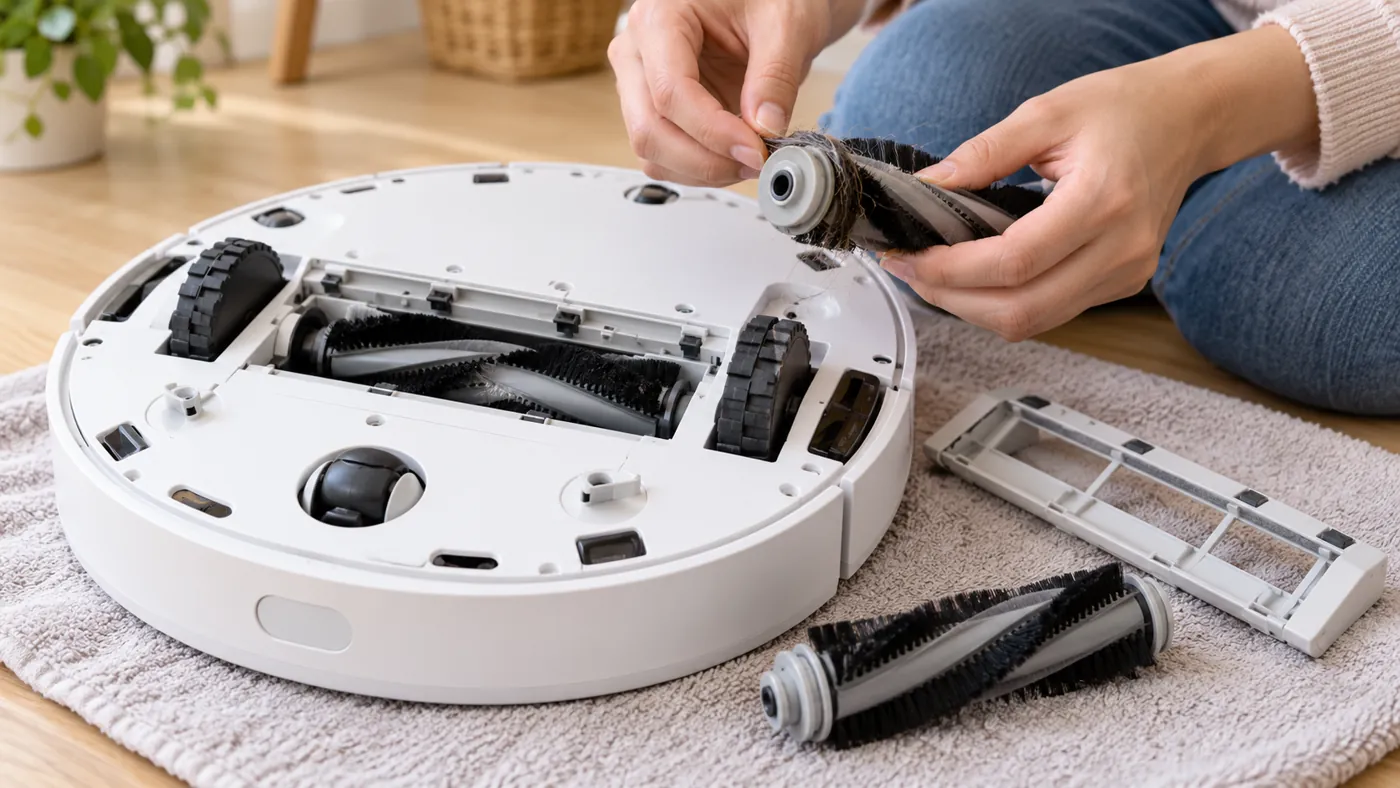
For detailed access instructions, see S8 main brush checks and S8 side brush troubleshooting. Repeat the short test after reassembly so you can tell whether this check helped.
Roborock’s support page also describes brief tests with individual removable parts taken out to isolate noise. Follow its exact instructions if you need that additional diagnostic step; do not treat a robot with removed parts as a normal cleaning setup.
4. Compare wheels and the mop mount
With the robot switched off, look for caught material around the wheels. Gently press and turn the drive wheels by hand and note any repeatable abnormal sound. Avoid forcing a wheel or opening the drive assembly.
If the noise appears only while mopping, stop and inspect the mount for trapped objects and correct seating. A short vacuum-only comparison without the mop mount can help distinguish this from a noise that occurs during all movement.
When to request service
Contact Roborock if the sound persists after these checks, a wheel repeatedly grinds, or the robot reports an error. Send the exact model, error text, recording and the results of each comparison. Repeating resets or buying several parts will not establish the cause.
FAQ
Should I factory reset a noisy S8?
Start with inspection and cleaning. A reset will not remove trapped thread or correct a poorly seated brush cover.
Can I identify a faulty motor from the sound alone?
No. Record when the noise occurs and what changes it, then seek diagnosis if it persists.
What if the noise stops after refitting the cover?
Run another short supervised clean with all components installed. Check that the cover stays latched and the sound does not return.
Find more guides in our Roborock troubleshooting hub.
Sources: Roborock S8 noise troubleshooting; original S8 manual.
If you suspect the small front caster, see how to clean the S8 front wheel and axle. Keep the wheel bracket installed.