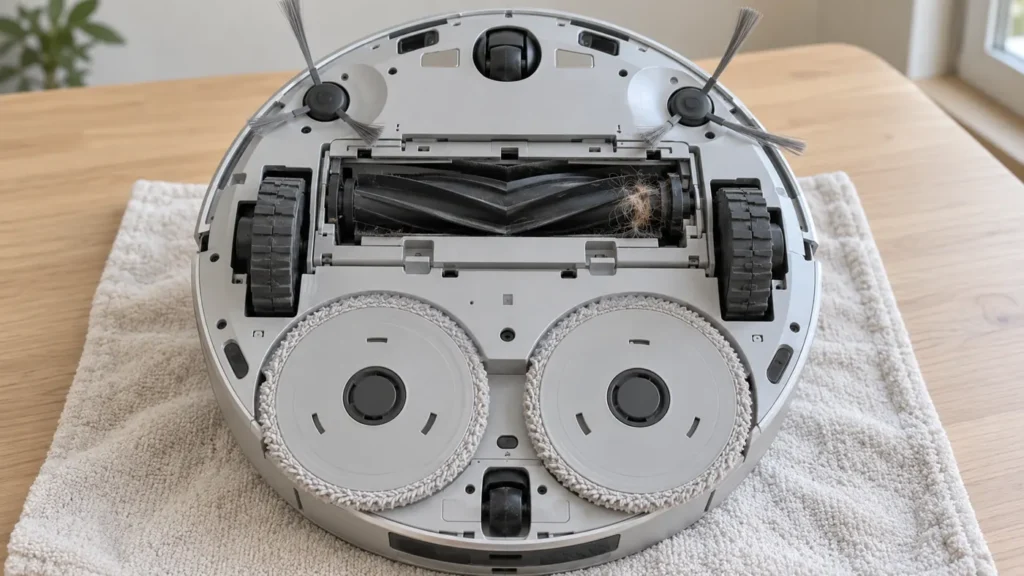
Begin with the quick checks. Stop if a step requires tools or experience you do not have.
If your Ecovacs T20 OMNI main brush is not spinning, start with the accessible roller, its ends and its installation. Hair can collect where it is difficult to see with the brush still mounted. A problem that begins just after maintenance deserves a fitting check before you buy another brush.
Also establish what you actually observed. The main brush is underneath the robot, so weak pickup or a different sound does not prove that it stopped rotating. Keep the exact app alert if there is one. Inspect the roller with the power off, then compare cleaning performance during a normal floor task with every part fitted.
Choose the next check from the symptom
| Observed symptom | Next check |
|---|---|
| Brush catches when gently turned after installation | Entangled ends and correct seating |
| Problem began after removing the roller | End fittings, assembly position and cover latch |
| Replacement brush does not fit normally | Exact T20 OMNI compatibility |
| Robot runs but leaves dirt behind | Bin and filter as well as the brush |
| Warning returns after accessible cleaning | Record the message and contact Ecovacs |
1. Stop the task before inspecting the underside
Pause cleaning, switch off the robot and place it gently upside down on a soft, stable surface. Keep its top protected and avoid pressing on the navigation turret. Do not try to watch the roller by holding the robot in the air while it runs.
Look for a cord, thread or compacted hair near the main brush opening. Note whether the cover sits evenly and whether the failure followed a recent change of parts. A quick photograph before removal helps you retain the original arrangement without guessing later.
2. Remove the brush and clear both ends
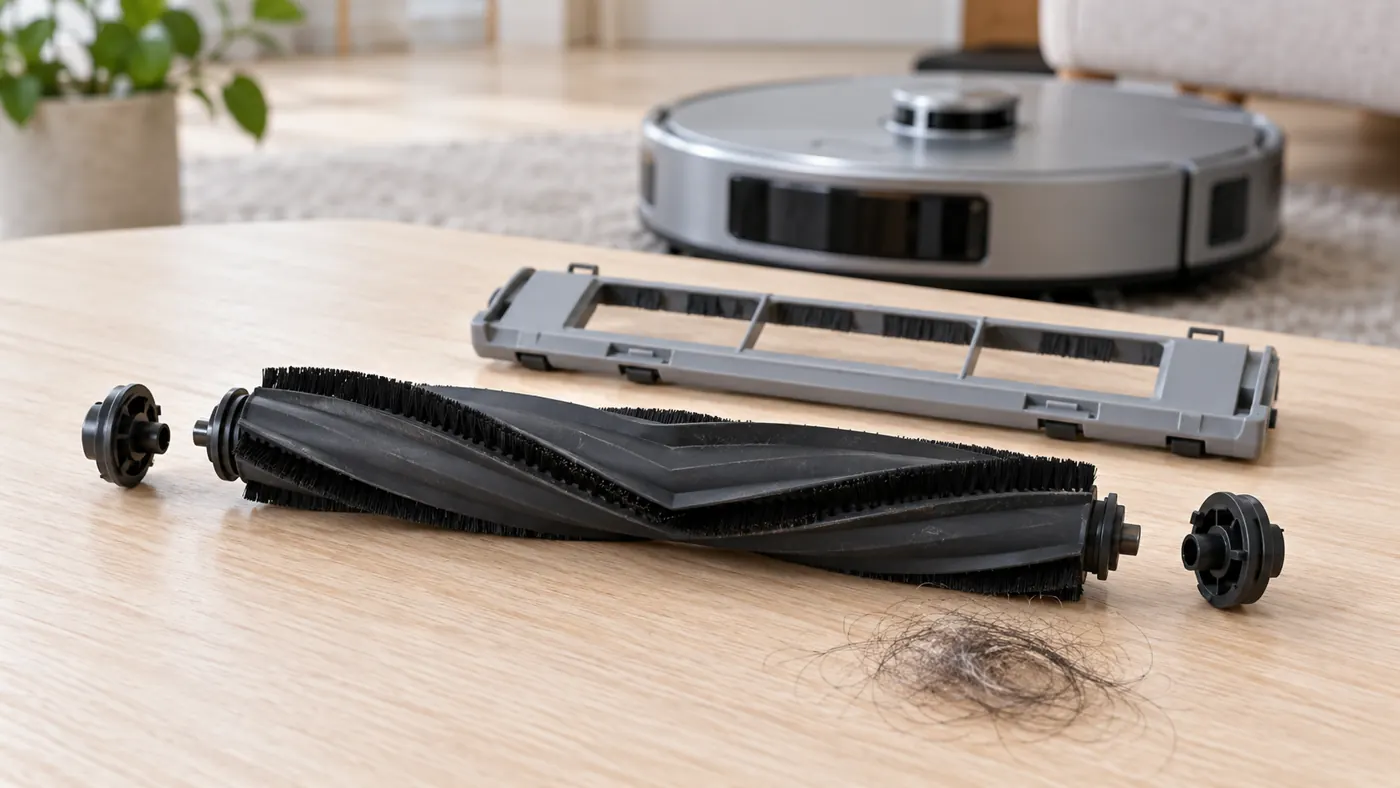
Follow Ecovacs’ T20 OMNI main-brush instructions. Remove the cover and main brush assembly, clear wound debris and inspect the accessories at both ends. Ecovacs allows those end accessories to be disassembled for cleaning. Work only with the removable parts described in that procedure.
Do not stop at the visible middle of the roller. Check each end for tightly wound strands and inspect the rubber surface for cuts or distortion. Clear debris gently rather than pulling against a stuck fitting. If you cannot release a part without force, keep a photo of the obstruction and ask support for the correct next step.
3. Check smooth movement before refitting the cover
The manufacturer says to reinstall the assembly securely until it clicks, then turn the brush to check that it moves smoothly before attaching the cover. Perform this check with the robot switched off. If it catches, review the cleaned end pieces and seating rather than forcing it through the resistance.
Once that check is complete, refit the cover and confirm that it closes normally. Do not start a cleaning task with the cover removed or leave a latch partly engaged. A cover that will not sit flat can be a useful sign of an installation problem; it is not something to solve by pushing harder.
4. Review a recently fitted replacement
If the original brush worked and the replacement immediately caused trouble, confirm the replacement’s fit list and product number. The T20 uses a single main brush; instructions for another robot’s paired rollers are not a reliable fitting reference. See the T20 OMNI parts compatibility section.
Compare the ends and overall shape with the original part if you still have it. Do not trim a fitting, modify the robot’s mount or add oil to make an uncertain part turn. A cracked end accessory, distorted roller or broken cover latch gives you a specific reason to seek a correctly fitting replacement.
5. Run a short floor test with all parts installed
Return the robot upright and start a vacuuming task on clear hard flooring. Keep the area small enough to observe the whole pass. Record whether an alert returns, whether cleaning stops and whether ordinary loose debris reaches the dustbin. Avoid an artificial pile of flour or sharp fragments.
If there is no brush alert but pickup remains poor, follow the T20 dirt pickup guide. A loaded bin or dirty filter needs its own check. If the problem is the small edge-cleaning brush instead, use the side-brush troubleshooting guide.
When cleaning is not enough
Contact Ecovacs if the brush remains difficult to turn after correct reassembly, the cover cannot secure properly or the same alert returns on a clear floor. Send the message, a photo of the brush ends, replacement details and the result of the short test. These observations do not establish an internal motor failure on their own.
Stop repeated trials if you hear persistent scraping or find a damaged mounting part. Routine brush maintenance does not require opening the robot’s motor housing. Keep a note of when the fault began so support can distinguish a longstanding problem from one introduced during cleaning.
Frequently asked questions
Does poor pickup prove the main brush stopped?
No. Check the bin, filter and cleaning route too. Use any brush-specific alert and the powered-off inspection to narrow the issue.
Should I run without the brush cover?
Refit the cover before a floor-cleaning test. The manufacturer’s manual movement check happens with the power off.
Can I add lubricant to the brush ends?
Follow the documented cleaning procedure. Do not add lubricant as an experiment to cure resistance.
Use the T20 maintenance schedule and Ecovacs troubleshooting hub for related checks.
If the brush turns but the robot still clicks or scrapes, use the T20 OMNI noise guide.
For the full removal, end-piece cleaning and refitting procedure, use the T20 OMNI main-brush cleaning guide.